
Most Pakistanis think this application is fake as it asks for a deposit to start playing the games. But it is not true. Unlike any other gaming platforms, B9 Game is genuine and trustworthy. Yes, these applications do ask for a deposit amount. It is totally up to the player how he manages that certain amount. Whether he doubles it or loses money because of his bad luck.
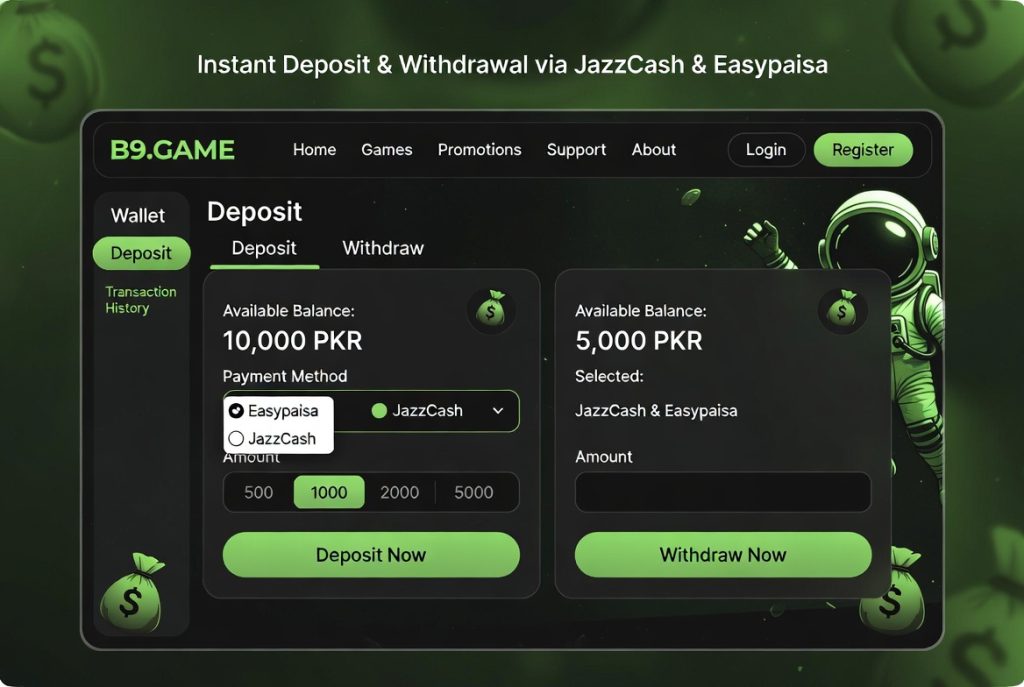
This content will let you know about the transaction processes and the B9 Game deposit & withdrawal through Easypaisa and JazzCash.
Two important things need to be done before you touch your wallet.
- Save your Transaction ID (TID) for every payment: when you transfer a payment, Easypaisa/JazzCash generates a unique Transaction ID for every payment. Make sure to save this ID, as this is the most important info when following up on any payment issue. Also, you can go to your app’s transaction history and find the specific transfer and take a screenshot of the TID. Save it for later.
- Set up a strong Wallet PIN: Before you go for any transactions, you must set a PIN. That PIN will then be used before withdrawing an amount. This step is recommended and is for the safety of every player.
Now, will move towards the steps of the B9 ame Deposit Guide that will show you the Easypaisa and JazzCash Step by Step procedure.
B9 Game Deposit Guide:
Step 1: Log in to B9 Game from your phone’s home screen.
Step 2: Go to your profile and then select the wallet option.
Step 3: Select the Deposit option from there. Also, you can directly select this option from the homepage of the app.
Step 4: Choose the Easypaisa or JazzCash option, whichever you prefer. Both payment accounts are listed as primary PKR deposit tracking platforms.
Step 5: Enter your desired amount. The minimum deposit amount is Rs. 100. If you deposit an amount greater than or equal to Rs. 100, you can proceed with the deposit process. Otherwise, it will not proceed.
Step 6: The B9 game generates a payment reference number, which you are going to send the amount to. Make sure not to use any previous reference number, as it is new and unique for every deposit. There are complaints about the B9 game deposit being successful, but the money is not showing. Do not worry. If you face such an issue, go to the chat support right away.
Step 7: Open your Easypaisa or JazzCash mobile wallet app. A notification will pop up on your screen. Just allow it and enter your PIN. Otherwise, you can send money by clicking on the “send money” option.
Step 8: Enter the previous reference that you have copied and complete the PKR deposit tracking transfer.
Step 9: At last, go to your B9 wallet and check if the amount is deposited or not. If not, then wait for 20 minutes.
Step 10: If it is not updated after 20 minutes, then go to your transaction history and copy the Transaction ID and message the chat support. They will help you asap.
B9 Game Withdrawal Guide:
Now, if you have doubled your deposit and want to withdraw it. Follow the steps below, and you will definitely get your winnings into your Easypaisa/JazzCash wallet.
Step 1: Firstly, you need to open the app and go to the Withdrawal option from your profile.
Step 2: Select Easypaisa or JazzCash as your instant cash withdrawal platforms. It is recommended to use the same account from which you have deposited the deposit amount. Sometimes, it caise mismatched and needs an extra step of verification.
Step 3: Enter your mobile wallet number. The amount is in PKR, check it out. Also, double-check your wallet number.
Step 4: Then, it will ask for the wallet PIN. Enter that.
Step 3: Click “SUBMIT”. It will take some time. Wait for around 24 hours.
You can contact the customer support for more details about the time and the amount. They will get back to you soon. Additionally, save the Transaction ID.
B9 Game Withdrawal Proof:
If you search for this application on YouTube and Telegram, you can find videos and posts. These videos and posts are related to withdrawals and their evidence. People post their winnings and withdrawals everywhere; this is what they have desired for. They want others to know about this. Screenshots are also shared everywhere, which show the B9 game withdrawal proof. You can look up their wallet history videos, also.
Some have blurred their transaction ID, but some may show. The ID is proof of real withdrawals and instant cash withdrawal. There is multiple evidence, and you have to trust this platform.
Some Problems occur:
Some complaints have been encountered by registered users, which are going to be discussed below. One of them is:
“B9 Game Deposit Successful, but Money Not Showing”
Most people complain about this thing. Yes, there are some delays in the deposition, but you need to stay calm. This delay is because of the payment method between the B9 game server and your Easypais/JazzCash account. To encounter such an issue, you need to wait for 20 minutes and check your wallet’s transaction history. If your wait is more than 20 minutes, then go directly to the live chat.
One thing that you do not need to do in this situation is: send the deposit again. It will cause a significant problem.
B9 Game Customer Support Agent:
In real time, if you are facing an issue, go to the customer team. You can contact them through;
- In-App Live Chat: the fastest way to contact the support team.
- WhatsApp number: the number is given on their official website; check from there
- Email: For more detailed and documented issues, you can go with this option.
FAQs
What is the minimum deposit on the B9 game through JazzCash or Esypaisa?
The minimum amount is Rs. 100 and also at the time of the transaction, it is displayed there. You can check at the deposit time.
I am in Pakistan, and how long do the withdrawals take in Pakistan?
It can take up to 24 hours. Wait for a bit.
Can I withdraw to a different account than the one I deposited with?
Yes, but there may be some errors. You need to perform an extra step of verification. If you really want to switch to another number, then make sure to add a new wallet number.